Game Programming in C++
Game Programming in C++ Chapter2 - Animation
skyho
2025. 8. 31. 14:39
반응형

책의 소스 코드를 직접 작성해보면서 정리한 글입니다. (실습환경: windows)
책 소스 코드: GitHub - gameprogcpp/code: Game Programming in C++ Code
1. 애니메이션(animation) 원리
대부분의 2D 게임은 플립북 애니메이션(flipbook animation) 기술을 사용해서 구현한다.
플립북은 연속적인 이미지를 빠르게 넘겨서 움직임을 만들어내는 기법을 말한다.
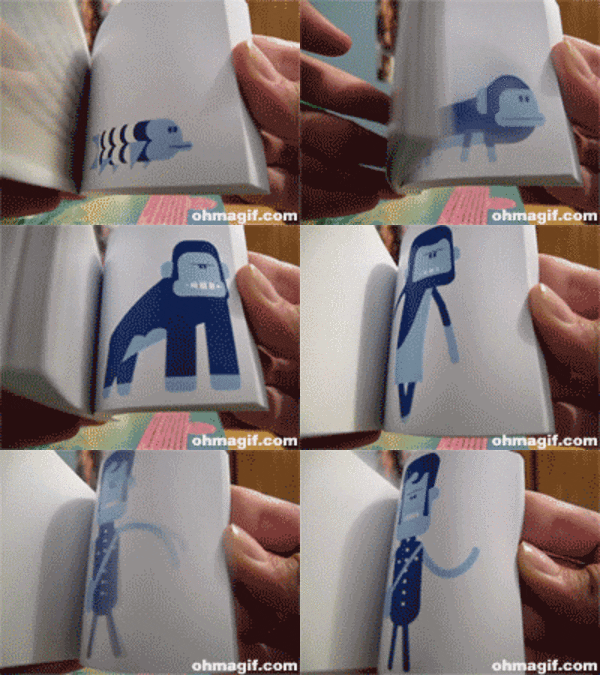
2. Animation Frame Rate
chapter2에서 애니메이션 속도는 24FPS다. 물론 고정된 값은 아니고 게임에 따라 다양한 선택지가 있다.
현재 출력해야할 애니메이션 프레임 번호는 다음과 같이 구할 수 있다.
_ship.current_frame += 24.0f * delta_time;
current_frame의 정수부가 출력해야할 이미지(애니메이션 프레임) 번호가 된다.
current_frame은 계속 누적되므로, 마지막 이미지를 출력했다면, 다시 첫번째 이미지를 출력해야 한다.
while (_ship.current_frame >= _ship_textures.size())
{
	_ship.current_frame -= _ship_textures.size();
}
3. Ship 추가
Chapter 2에서는 4장의 Ship 그림을 이용해 애니메이션을 구현하다.
우주선 표현을 위한 구조체를 다음과 같다.
struct Ship
{
	SDL_Texture* sdl_texture;
	float x, y; // texture position
	float w, h; // texture size
	float animation_fps; // animation frame rate
	float current_frame; // current frame displayed
	float scale;
};
4. Game.hpp
Ship 구조체와, Ship texture를 저장할 vector를 추가했다.
vector에 저장된 texture를 frame 속도에 맞춰서 출력하면 애니메이션이 구현된다.
#include <string>
#include <vector>
#include <unordered_map>
#include "SDL3/SDL.h"

...

struct Ship
{
	SDL_Texture* sdl_texture;
	float x, y; // texture position
	float w, h; // texture size
	float animation_fps; // animation frame rate
	float current_frame; // current frame displayed
	float scale;
};

class Game
{
public:
	...

private:
	...
	std::vector<SDL_Texture*> _ship_textures;
	Ship _ship;
};
5. Game.cpp
- initialize(): _ship 변수 초기화 코드 추가
bool Game::initialize(int w, int h)
{
	...

	_ship.x = 100.0f;
	_ship.y = 384.f;
	_ship.w = 0.0f;
	_ship.h = 0.0f;
	_ship.scale = 1.5f;
	_ship.animation_fps = 24.0f;

	return true;
}
- loadData(): ship texture 저장
bool Game::loadData()
{
	...

	SDL_Texture* texture = getTexture("Assets/Ship01.png");
	_ship_textures.emplace_back(texture);
	texture = getTexture("Assets/Ship02.png");
	_ship_textures.emplace_back(texture);
	texture = getTexture("Assets/Ship03.png");
	_ship_textures.emplace_back(texture);
	texture = getTexture("Assets/Ship04.png");
	_ship_textures.emplace_back(texture);

	_ship.sdl_texture = _ship_textures[0]; // Set the active texture to first frame

	return true;
}
- drawTexture(): ship texture 출력
void Game::drawTexture()
{
	...

	SDL_FRect r;
	r.w = _ship.w;
	r.h = _ship.h;
	r.x = _ship.x;
	r.y = _ship.y;

	SDL_RenderTexture(
		_sdl_renderer,
		_ship.sdl_texture,
		nullptr,
		&r
	);
}
- updateGame(): frame을 계산해서 출력해야할 ship texture를 결정한다.
void Game::updateGame()
{
	Uint64 current_time = SDL_GetTicks();
	while (current_time < _ticks_cnt + 16) //16ms
	{
		current_time = SDL_GetTicks();
	}

	//delta time = last frame - current frame
	//converting to per second
	float delta_time = (SDL_GetTicks() - _ticks_cnt) / 1000.0f;

	//delta time validation
	//maximum delta time is 0.05 second
	if (delta_time > 0.05f)
	{
		delta_time = 0.05f;
	}

	//backgroud scrolling implementation
	...

	// Update the current frame based on frame rate
	// and delta time
	_ship.current_frame += _ship.animation_fps * delta_time;

	// Wrap current frame if needed
	while (_ship.current_frame >= _ship_textures.size())
	{
		_ship.current_frame -= _ship_textures.size();
	}

	// Set the current texture
	int idx = static_cast<int>(_ship.current_frame);
	_ship.sdl_texture = _ship_textures[idx];
	SDL_GetTextureSize(_ship.sdl_texture, &(_ship.w), &(_ship.h));

	_ticks_cnt = SDL_GetTicks(); // update tick count for next frame
}
6. 결과
우주선 4장의 사진으로 애니메이션(로켓 불꽃)을 구현하고 있다.

반응형