Game Programming in C++
Game Programming in C++ Chapter1 - 벽(wall) 그리기
skyho
2025. 8. 16. 23:10
반응형

책의 소스 코드를 직접 작성해보면서 정리한 글입니다. (실습환경: windows)
책 소스 코드: GitHub - gameprogcpp/code: Game Programming in C++ Code
1. 벽 그리기
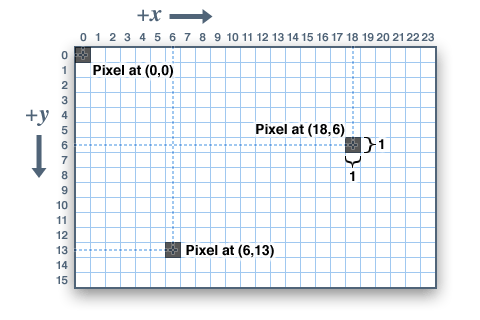
벽을 그리기 위해서는 화면 좌표계에 대한 이해가 필요하다.
좌표의 원점(0, 0)은 좌측 상단이다.
x값이 증가하면, 왼쪽에서 오른쪽으로 이동한다. (왼쪽 → 오른쪽)
y값이 증가하면, 위에서 아래로 이동한다. (위 → 아래)
2. Game.hpp
_thickness 변수를 추가한다.
#include "SDL3/SDL.h"

class Game
{
public:
	...(생략)...

private:
	...(생략)...
	const float _thickness; // 벽 두께
};
3. Game.cpp
생성자에 _thickness 변수 초기화를 추가한다.
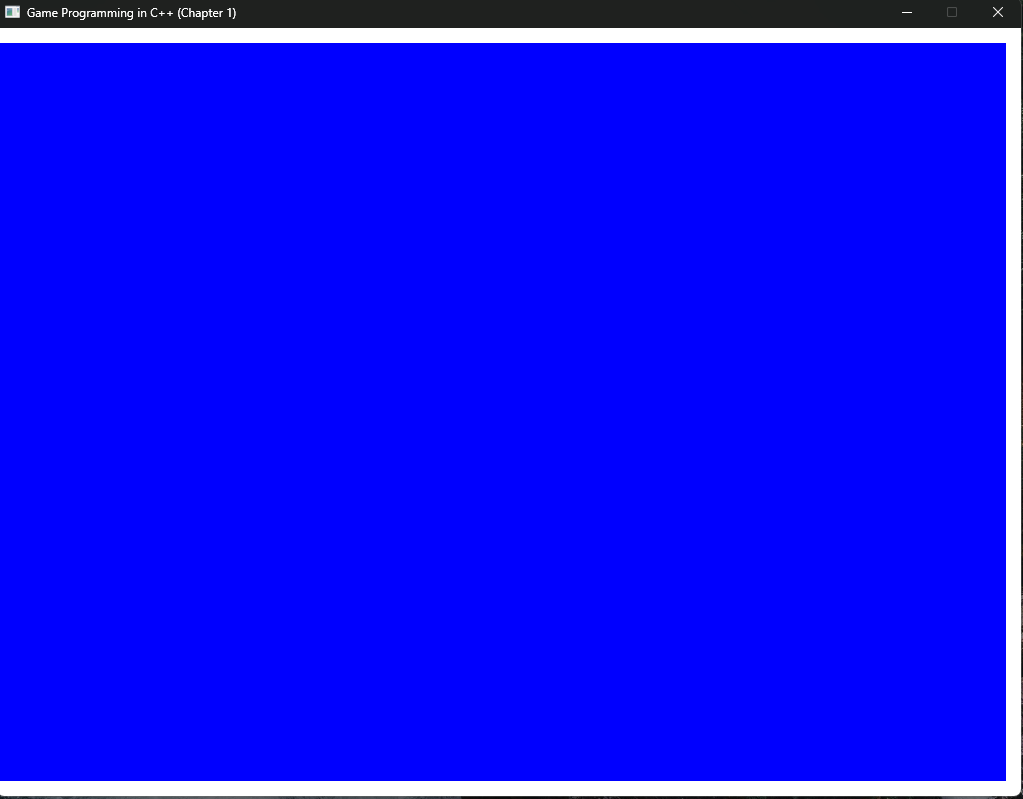
generateOutput()에서 흰색으로 벽을 그린다. 모든 좌표 값은 화면 좌표계 규칙을 따르고 있다.
Game::Game() : _sdl_window(nullptr), _w(1024), _h(768), _running(true), _sdl_renderer(nullptr),
	_thickness(15.0f)
{
}

void Game::generateOutput()
{
	//set draw color to blue
	SDL_SetRenderDrawColor(
		_sdl_renderer,
		0,   //R
		0,   //G
		255, //B
		SDL_ALPHA_OPAQUE // 투명도(transparency) / 255 = 완전한 색, 0 = 완전히 투명
	);

	// blue 색상으로 전체를 칠한다
	SDL_RenderClear(_sdl_renderer);

	//draw color to white
	SDL_SetRenderDrawColor(_sdl_renderer, 255, 255, 255, 255);

	SDL_FRect wall{
		0.0f,	//top of left x
		0.0f,	//top of left y
		static_cast<float>(_w),	//width
		_thickness	//high
	};

	//top wall
	SDL_RenderFillRect(_sdl_renderer, &wall);

	//bottom wall
	wall.y = static_cast<float>(_h) - _thickness;
	SDL_RenderFillRect(_sdl_renderer, &wall);

	//right wall
	wall.x = static_cast<float>(_w) - _thickness;
	wall.y = 0;
	wall.w = _thickness;
	wall.h = static_cast<float>(_h);
	SDL_RenderFillRect(_sdl_renderer, &wall);

	//렌더링한 화면을 출력한다.
	SDL_RenderPresent(_sdl_renderer);
}
4. 결과
반응형